
Refund a payment
Send all or part of a crew member's card payment back through Stripe from their profile, and see what happens to the payment status, receipt and activity log.
If a crew member paid a membership fee or deposit by card, you can send all or part of it back from the person's profile. The money goes back to the card they paid with, through your Stripe account. You don't have to log in to Stripe.
Payments on the profile
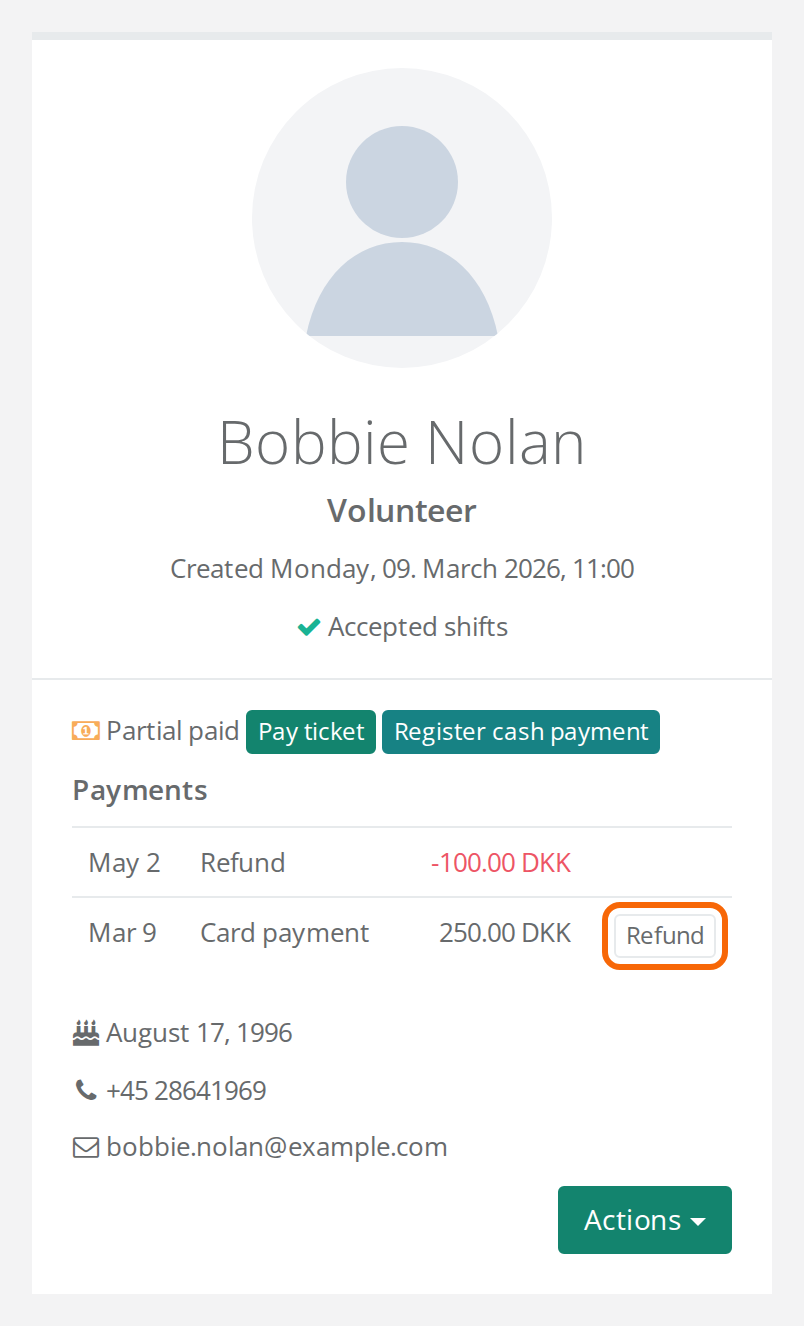
If the person has paid anything, there is a Payments list at the top of the profile, under the payment status. It shows every payment with its date and amount:
- Card payment: paid by card through Stripe.
- Cash payment: registered with Register cash payment.
- Paid amount set by admin: corrected with Set paid amount.
- Refund: money sent back. The amount has a minus.
- Refund failed: a refund Stripe couldn't complete. See When a refund is pending or fails.
Next to a card payment that can be refunded, there is a Refund button. If the whole payment has been refunded, it says Refunded instead.
How to refund
- Open the person's profile.
- Click Refund next to the card payment under Payments.
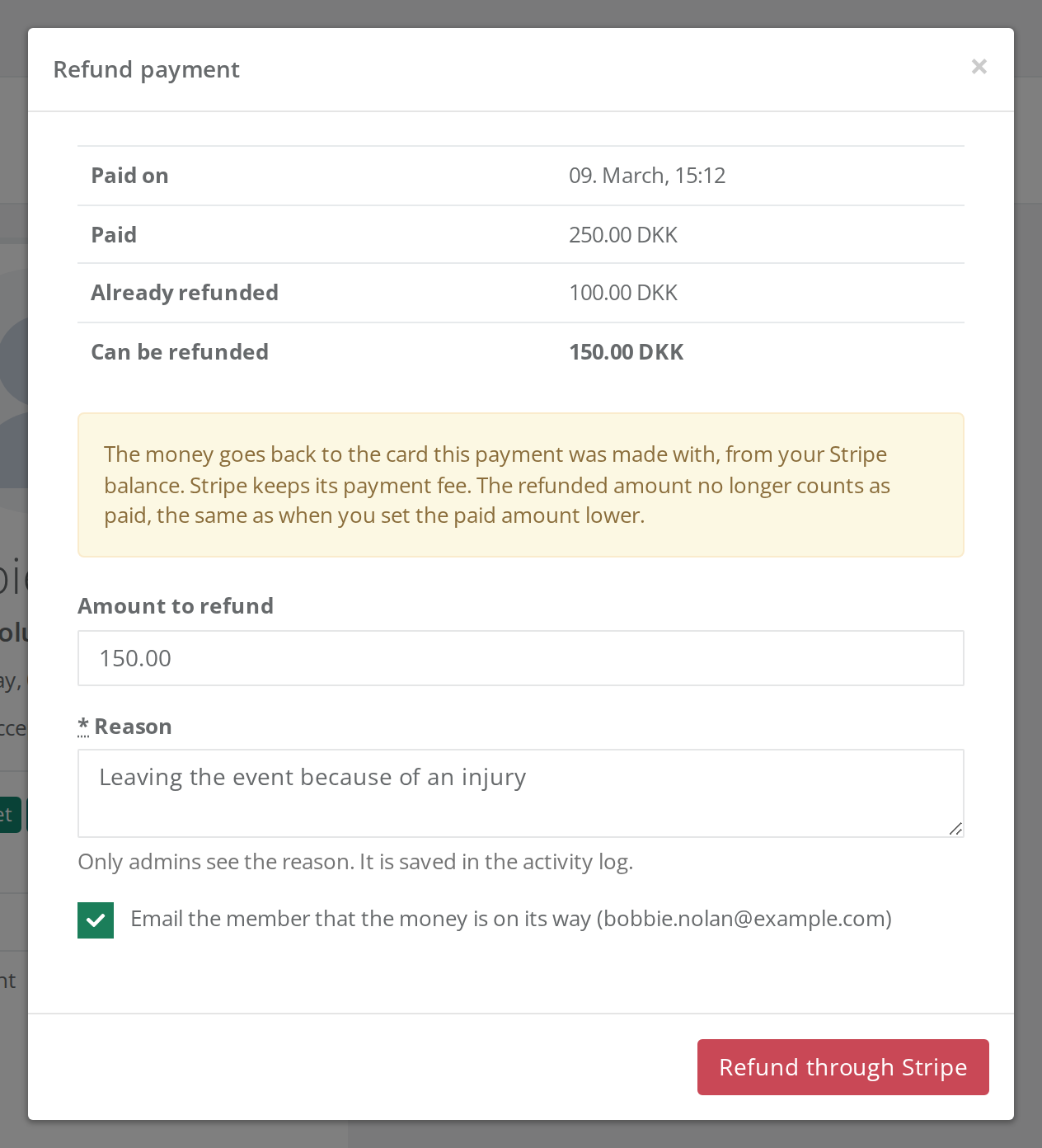
- At the top you can see what was paid, what has already been refunded, and what Can be refunded.
- Amount to refund holds the whole amount that can be refunded. Change it if you only want to send part of it back.
- Write a Reason. It is required. Only admins can see it. It is saved in the activity log and is not included in the email to the person.
- Leave Email the member that the money is on its way ticked if the person should get a receipt. It is ticked from the start.
- Click Refund through Stripe.
If it goes through, you see "… was refunded to the member's card.", and the refund appears in the list.
You can't refund more than what is left of the payment, nor more than the person counts as having paid in total.
What happens next?
- The money is taken from your Stripe balance and sent back to the card. Stripe keeps its fee for the original payment.
- Payment status: The refunded amount no longer counts as paid, the same as when you set the paid amount lower. So the person shows as Partial paid or Not paid. If Pay during signup is switched on for the member type, the person gets the Missing deposit window again the next time they open a page in Crewstack.
- Activity: The Activity box on the profile says "refunded … to …" with the amount, the person's name and your reason. Only admins can see it.
- Receipt: If you left the box ticked, the person gets the Refund receipt email. A super admin can change its text under Customize > Mail templates. See Mail templates.
When a refund is pending or fails
If there isn't enough money in your Stripe balance, the refund can end up pending. You then see "Stripe has accepted the refund of …, but it is pending until there is enough money in your Stripe balance.", and the refund shows Pending in the list. The person only gets the receipt once the refund has gone through.
If a refund fails later in Stripe, the amount is put back. A Refund failed line appears in the list, the amount counts as paid again, and it shows in the activity. Check your Stripe account and refund again if the money still needs to go back.
Refunds made directly in Stripe
If you refund a card payment directly in your Stripe account, the refund comes into Crewstack automatically. It shows in the Payments list and in the activity as "refunded … to … in Stripe".
- Crewstack only takes off what the person still counts as having paid. If you have already lowered the paid amount with Set paid amount, it isn't taken off again.
- This only applies to refunds made from 24 November 2026. Correct older refunds yourselves with Set paid amount.
- The person gets no receipt from Crewstack for a refund made in Stripe.
Pitfalls
- Don't correct the paid amount afterwards. A refund with Refund has already lowered the paid amount. If you take the refund off again with Set paid amount, as you had to before, the person shows as having paid too little.
- Card payments only. Cash payments and amounts set by an admin have no Refund button, because Crewstack can't send cash back. Correct the amount with Set paid amount instead. See Membership fees.
- Guest lists and older ticket payments. Payments for guest list tickets, and older payments under My ticket that were registered on the ticket, don't show in the list and can't be refunded in Crewstack. Refund them in your Stripe account.
- "Stripe already has a refund …" If you see this, an earlier refund from Crewstack went through in Stripe without being saved, for example because the connection dropped. It is saved now. Check the Payments list before you refund again.
Didn't find the answer? Write to support@crewstack.io.