
Let crew members see who has signed up for a shift
Switch on that crew members can see the names of the people already signed up for their team's shifts when they pick shifts in the portal.
When crew members pick their own shifts, many want to know who they will be working with. You can let them see the names of the people already signed up for a shift before they pick it themselves. It is off by default.
How to switch it on
Only a Super Admin and the organizer's admins can change the setting:
- Go to Settings > General settings.
- Click Teams in the menu on the left.
- Switch on Show members who else signed up for their teams' activities. It is at the bottom, below the yellow warning.
- Click Save at the top of the page.
By "activities" the setting means shifts. They are the same thing that is called shifts everywhere else in Crewstack.
What crew members see
Crew members see it where they pick shifts: under Find shifts in the portal. See How crew members pick their own shifts.
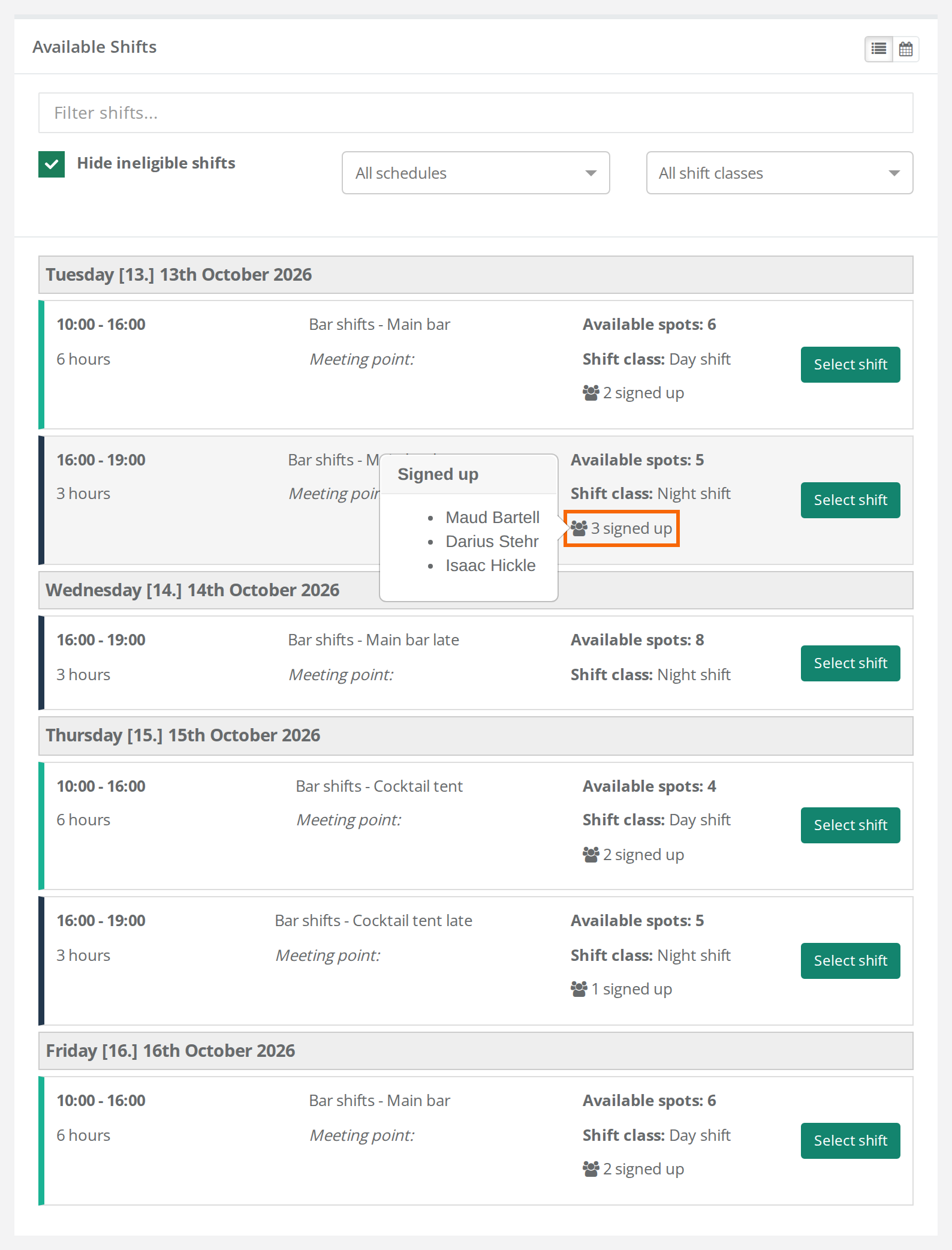
- Under Available Shifts the shift has an icon of people and a number, for example 3 signed up.
- When the crew member holds the mouse over the number, a small box, Signed up, opens with the names. Without a mouse, the crew member can move to the number with the Tab key. Then the box opens too.
- If there is nobody to show on a shift, nothing is shown.
- It works in both the list and the calendar. In the calendar the crew member clicks the shift first.
Who can see what?
- Own team only. The crew member sees the names on shifts in schedules that belong to a team they are on, or to a team group that team is in.
- Names only. No email, phone or other data fields are shown.
- Everyone on the shift counts. That includes people you have put on the shift yourself. Shift preferences don't count until you have assigned the shift.
- Team leads and admins also see the number on the shifts they manage when the setting is on. Otherwise the setting doesn't change what they can see.
Pitfalls
- Only with shift selection. The names are only shown where crew members pick or prefer shifts. If you assign all shifts yourself and the crew members don't have Find shifts, the setting changes nothing.
- Not on shifts the crew member has picked. The names are not shown under Selected shifts. They are only shown on the shifts that can still be picked.
- Not on shift bundles. Shifts in a shift bundle don't show who has signed up. See Shift bundles.
- Not in the Crewstack app. Shifts are picked in the portal in a browser, and the names are only shown there.
- Schedules for the whole event. A schedule without a team or team group doesn't show names to crew members, even when the setting is on.
- The number is lower than expected. People with no name on their profile and team leads who are hidden with Hide from member list are not on the list and are not counted. So the number can be lower than the number of spots taken. See Manage your team as a team leader.
- The number is not up to date. The numbers are fetched when the page opens. Ask the crew member to reload the page to see the latest signups.
Didn't find the answer? Write to support@crewstack.io.